 |

|
|
|
|

Good: Speed up your computer with SecurityTaskManager. Slow processes and malicious programs prevent you from getting anything done quickly, and may even be a way for criminal hackers to take over your PC. ... (this pertains remove driver, disable service, detect threat, file management, prc view, windows file, windows process, process viewer, Windows Task Manager, taskman, ...) | Security Task Manager 2.1.9.0 [Home] - by: A. & M. Neuber Software - Download 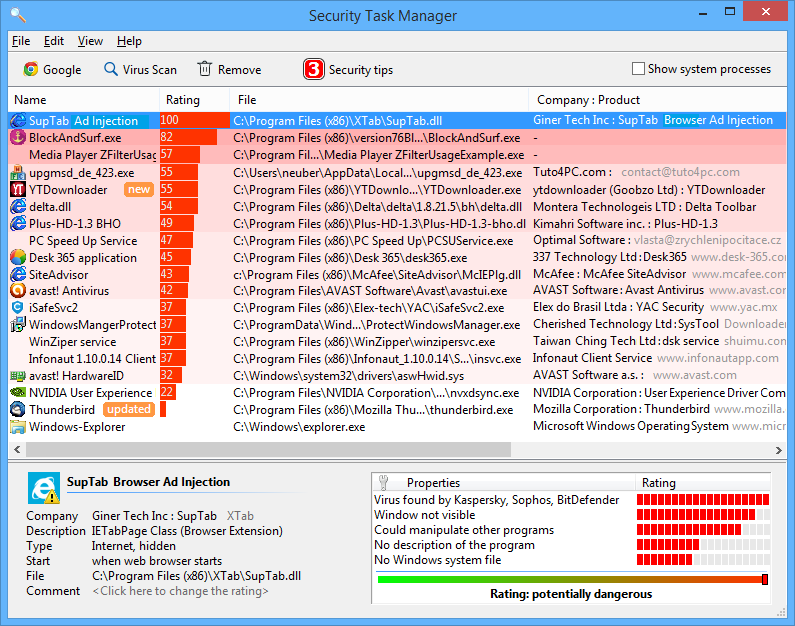 Click to enlarge Some words about Security Task Manager: Are you fed up of your PC being slow to load, or taking a long time to open programs or run video and audio files? The problem could be related to old or malicious software which is running without your knowledge. With criminal computer activity so common, and with software updating all the time, it is not surprising that you feel as though your computer is taking too long to start up. All of these files start running as soon as the main part of the computer is opened, and they can be very hard to stop if you don't know anything about them, or can't even see that they are there. Rather than throw out your computer, and buying an expensive new version, it makes better sense to download Security Task Manager, which is the best way of keeping your programs and processes efficient and slimline. Downloading is easy, and can be done in a few moments, and the real benefits of Security Task manager will be obvious when you try it out. By being able to see exactly what is holding up your streaming of YouTube, or your efficiency when trying to download work documents, you will be able to decide whether you need certain programs or not. Security Task Manager is particularly effective and highlighting problems with malicious or old-fashioned software, so if you have accidently downloaded a Trojan, or are still stuck with the least updated version of Adobe known, then you can quickly see those files, assess how much of a risk they are to your computer, and get rid of them if they are not having a positive effect or are not needed. The Manager will show you all of the files currently running on your computer, making a note of who developed the program, where it originated, and its rating as a harmless or malicious piece of software. Being able to see all of this information quickly and efficiently will allow you to make changes to those files quickly. All you need to do is highlight the suspicious program, and then remove it from the manager. News, new features for this Major Update:
User's remarks, reviews, comments (Add your comment / review) | Download size: 2930 Kb Date: 09/20/2017 Program home Install/Uninstall: Install and Uninstall OS: Win2000, WinXP, Win7 x32, Win7 x64, Windows 8, Windows 10, WinServer, WinOther, WinVista, WinVista x64 Sys requirements: 3 MB free disk space Language: English, Chinese, Czech, Danish, Dutch, Finnish, French, German, Italian, Japanese, Korean, Norwegian, Other, Polish, Portuguese, Russian, Spanish, Swedish, Turkish, Ukrainian |
See also in Utilities and Hardware: Antivirus
|


 Free Download: