 |

|
|
|
|

Good: Tipard MKV Video Converter has the powerful function of converting MKV, HD MPEG, MOD, MOV, SWF, etc. to WMV, Super VCD, AVI, MPG, MP4, HD videos, etc. And it is also can extract audio from MKV and oth... (this pertains Convert MKV to HD, Convert MKV files, Convert MKV, MKV to 3GP Converter, MKV to MP4, MKV to MPG, MKV Video Converter, MKV to AVI Converter, MKV Converter, ...) | Tipard MKV Video Converter 7.0.88 [Home] - by: Tipard Studio - Download 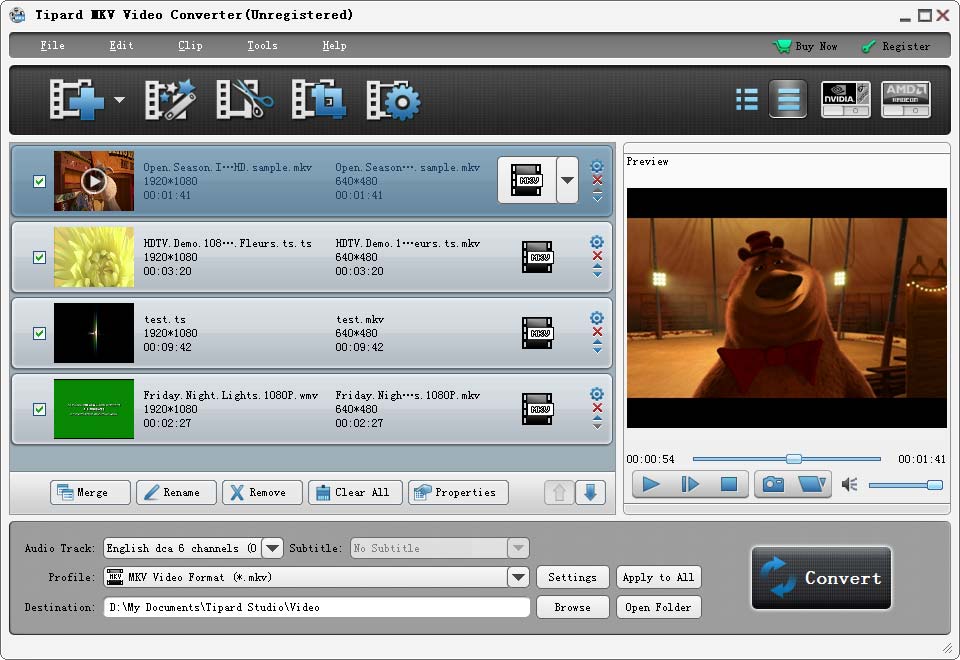 Click to enlarge Some words about Tipard MKV Video Converter : Tipard MKV Video Converter, the excellent MKV Video Converter software, which can convert MKV, MPEG, HD MPEG, etc. to popular video formats, like WMV, Super VCD, AVI, MPG, MP4, HD videos, etc. And it is also can extract audio from MKV and other videos to popular formats, like AU, MP3, M4A, MP2, OGG, WMA, WAV, etc. Also, it has powerful editing functions, such as splitting, cropping, merging, watermarking, ect. Moreover, it supports iPhone 6/6 Plus/5s/5c, iPad mini 2/3, iPad Air and Samsung Galaxy Note 4. Key functions: 1.Convert MKV to any popular videos and HD videos Tipard MKV Video Converter can help you convert MKV videos to any other video formats, even HD video formats. 2.Get audio formats from MKV video You can convert MKV and many other video formats to MP3, MP2, AAC, AC3, WAV, WMA, M4A, RM, RAM, etc. popular audio formats. 3.Adjust output settings Tipard MKV Video Converter provides the function of adjusting both video settings, like Encoder, Bitrate, Resolution, Frame rate, and audio settings. And the "Deinterlacing" function can help you improve the video quality by converting the interlaced video to a progressive one.You can select audio track or subtitlefor your output video. 4.Multiple profile Tipard MKV Video Converter can help you choose any profile (AVI, MPG, MP4, HD videos,OGG, WMA, WAV audio) you want to fit your media player such as supports iPhone 6/6 Plus/5s/5c, iPad mini 2/3, iPad Air and Samsung Galaxy Note 4 and more. 5.Provide high speed and intuitive interface This video converter supports multi-core CPUs, which can take full advantage of your PC power to accelerate the converting speed. 6.Edit effect The "Crop" function can help you crop the video frame to remove the unwanted playing areas and the black edges to fit your player's screen. And you can also trim video length and merge several video clips into one. Watermark your video in the form of a text or image. And you can set its position and transpacency. News, new features for this Major Update:
User's remarks, reviews, comments (Add your comment / review) | Download size: 32153 Kb Date: 10/27/2016 Program home Install/Uninstall: Install and Uninstall OS: Win2000, Win7 x32, Win7 x64, WinOther, WinVista, WinVista x64, WinXP, Other Sys requirements: 1.2GHz Intel or AMD CPU, or above; 1G RAM or more. Language: English |
See also in Multimedia and Productivity: Archive
|


 Free Download: